
68 NiuNiu Top-Up Guide
68 NiuNiu top-up offers deposit methods including QR code scanning, bank transfer, FPX online banking, and Touch 'n Go auto deposit QR, with each channel having its own deposit amount range and process. After entering the top-up page, users can first select a deposit method and enter the amount, then complete payment following the receiving details or payment entry provided on the page; bank transfer and some QR methods also require correctly filling in the transfer remark and uploading the transfer receipt.
- 1. What Top-Up Methods Does 68 牛牛 Have?
- 2. 68 牛牛 QR Code Top-Up Steps
- 3. 68 牛牛 Bank Transfer Top-Up Steps
- 4. 68 牛牛 FPX Online Banking Top-Up Steps
- 5. 68 牛牛 TNG Auto Deposit QR Top-Up Steps
- 6. 68 牛牛 Top-Up Amount Range
- 7. What Are the Requirements for Transfer Remarks and Proof?
- 8. 68 牛牛 Top-Up Notes
- 9. 68 牛牛 Top-Up FAQ
What Top-Up Methods Does 68 NiuNiu Have?
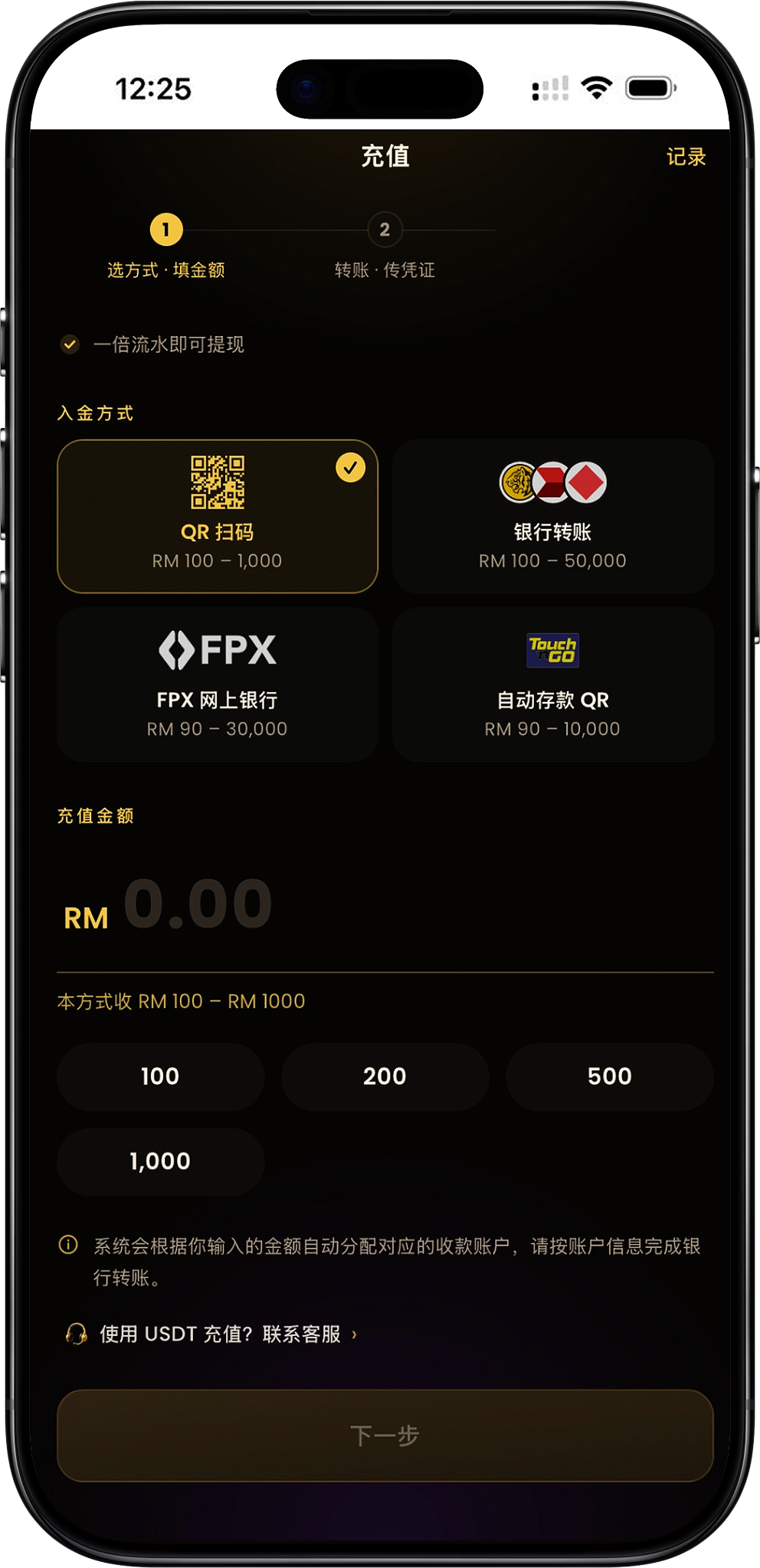
The current 68 NiuNiu top-up page provides four main deposit methods: QR code scanning, bank transfer, FPX online banking, and Touch 'n Go auto deposit QR. The page also provides a USDT top-up customer service entry. If USDT is needed, you can contact customer service according to the page prompts to learn about the corresponding method.
QR code scanning
The page amount range for QR code top-up is RM100–RM1,000. After selecting the amount, proceed to the next step, complete the transfer according to the receiving QR code and information generated by the platform, and then submit the relevant proof as required.
Bank transfer
The page amount range for bank transfer is RM100–RM100,000. The system will assign the corresponding receiving account based on the amount entered by the user, and then payment needs to be completed according to the displayed bank, account name, account number, and transfer remark.
FPX online banking
The amount range for FPX online banking is RM90–RM30,000. After selecting the top-up amount and bank, you can proceed to online banking payment; the page states that after successful payment it is automatically credited, and no additional transfer proof needs to be uploaded.
TNG auto deposit QR
The amount range for Touch 'n Go auto deposit QR is RM90–RM10,000. After the user selects the amount, they proceed to payment and scan the code to complete payment, and the page states that after payment is completed it is automatically credited, and no additional proof needs to be submitted.
USDT top-up
The top-up page features a "Using USDT to top up? Contact customer service" entry. The current page does not display a specific USDT amount range or self-service top-up steps, so when this method is needed, it should be handled through the customer service entry provided on the page.
68 NiuNiu QR Code Top-Up Steps
Step 1: Select QR code scanning
After entering the 68 NiuNiu top-up page, select "QR Code Scanning" in "Deposit Method." If you need to enter the platform, you can use the official Telegram entry: https://t.me/niuniu68_bot?start=6081936318. The current page shows that this method supports RM100–RM1,000.
Step 2: Fill in the top-up amount
Enter the amount you intend to top up and confirm that the amount is within the range allowed by the current QR code scanning method. The page will also provide commonly used amounts for quick selection.
Step 3: Click Next
After confirming the method and top-up amount, click "Next" to enter the "Transfer · Upload Proof" stage. The system will generate the corresponding receiving information based on this top-up.
Step 4: Scan the receiving QR code
The second step page will display the Malaysia National QR used for this transfer, as well as the corresponding amount due. Users can use a supported payment method to scan the QR code provided on the page and complete payment.
Step 5: Verify the transfer information and remark
The page also displays the receiving bank, receiving account name, receiving account number, and the exclusive "Transfer Remark" for this transaction. When paying, operate according to the information actually displayed on the page and fill in the transfer remark for that order completely.
Step 6: Upload the transfer proof
After completing the transfer, return to the 68 NiuNiu top-up page, click to select the transfer proof, and upload the payment screenshot. The page states that any image in the album can be selected, and the system will automatically compress it upon submission.
Step 7: Submit the top-up information
After uploading the proof, continue to submit according to the page so that the backend can verify this payment information and process the crediting. Before submitting, confirm that the amount, receiving information, remark, and proof all correspond to the same top-up.
68 NiuNiu Bank Transfer Top-Up Steps
Step 1: Select bank transfer
Select "Bank Transfer" on the top-up page. The current page shows that bank transfer supports RM100–RM100,000, and a top-up amount within the range can be entered according to actual needs.
Step 2: Enter the top-up amount
Fill in the top-up amount for this transaction. The system will automatically assign the corresponding receiving account based on the amount entered by the user, so after proceeding to the next step, the account information provided on that page should be used for the transfer.
Step 3: View the receiving account assigned by the system
After clicking next, the page will display the receiving bank, receiving account name, receiving account number, and exclusive transfer remark to be used for this transfer. Payment should be made according to the information actually provided on that page, and other receiving accounts should not be used on your own.
Step 4: Transfer using a same-name bank account matching identity verification
The page clearly requires the transfer to be completed using a same-name account matching the user's identity verification. The top-up bank account name must match the identity verification name, otherwise the funds may not be accepted, so the account name should be verified before payment.
Step 5: Fill in the specified transfer remark
When making a bank transfer, the "Transfer Remark" displayed on the top-up page should be entered as-is in the Reference or remark field of the bank payment page. This remark is used to identify this top-up order, so do not modify it, omit it, or enter other text on your own.
Step 6: Complete DuitNow or bank transfer
Complete the corresponding bank payment according to the receiving account information. If using a transfer page such as DuitNow, verify again that the receiving account number, RM amount, and Reference are consistent with the information provided on the 68 NiuNiu page.
Step 7: Return to the page and upload the transfer proof
After completing the bank transfer, you need to return to the top-up page and upload the transfer proof. The page prompts that after completing the transfer, you must come back and upload the proof, otherwise customer service cannot verify the top-up.
Step 8: Wait for verification and crediting
After submitting the payment proof, the backend verifies it based on the top-up amount, receiving account, order remark, and payment information, and completes the corresponding crediting after confirmation.
68 NiuNiu FPX Online Banking Top-Up Steps
Step 1: Select FPX online banking
Select "FPX Online Banking" in the deposit method on the top-up page. The currently supported top-up amount range is displayed as RM90–RM30,000.
Step 2: Fill in the top-up amount
Enter a top-up amount that meets the FPX range. The page will display selectable amounts according to the current method and indicate the minimum and maximum amounts acceptable for this method.
Step 3: Select a bank
The FPX page will list the currently selectable banks, including those displayed on the page such as Malayan Banking, CIMB Bank, Public Bank, RHB Bank, Hong Leong Bank, Alliance Bank Malaysia, Bank Simpanan Nasional, and Affin Bank. The actual available banks shall be subject to what is displayed on the top-up page at that time.
Step 4: Click Next to proceed to payment
After confirming the bank and amount, click "Next · Proceed to Payment." The system will guide you to the corresponding online banking payment process.
Step 5: Complete the online banking payment
Complete the payment according to the payment page of the selected bank. The payment amount should be consistent with the amount selected on the 68 NiuNiu top-up page to avoid a situation where the payment amount does not match the order.
Step 6: Automatic crediting after payment
The FPX page states that "after payment it is automatically credited, no proof upload needed." Therefore, after successfully completing the FPX payment, there is no need to separately upload a transfer screenshot as with regular bank transfers.
68 NiuNiu TNG Auto Deposit QR Top-Up Steps
Step 1: Select auto deposit QR
Select the "Auto Deposit QR" with the Touch 'n Go logo on the top-up page. The current page shows that this method supports RM90–RM10,000.
Step 2: Select the top-up amount
Fill in or select a top-up amount within the range. For example, the page may display amount options such as RM90, RM100, RM500, RM1,000, RM5,000, and RM10,000 according to the current method.
Step 3: Click Next to proceed to payment
After confirming the amount, click "Next · Proceed to Payment" and continue operating according to the payment page provided by the system.
Step 4: Complete payment using the QR code
Complete the scan-to-pay payment according to the payment QR code generated on the page. When paying, confirm that the actual payment amount matches the current top-up order amount.
Step 5: Wait for automatic crediting
The auto deposit QR page states that "scan to pay, after payment it is automatically credited, no proof upload needed." Therefore, after completing payment, there is no need to perform the proof upload step required in the bank transfer method.
68 NiuNiu Top-Up Amount Range
QR code scanning: RM100–RM1,000
QR code scanning currently supports a minimum of RM100 and a maximum of RM1,000. After selecting this method, the top-up amount entered needs to be within this range.
Bank transfer: RM100–RM100,000
The current bank transfer page shows support for RM100–RM100,000, making it the channel with the highest page-displayed upper limit among the four main top-up methods.
FPX online banking: RM90–RM30,000
FPX currently supports RM90–RM30,000. Users should enter a top-up amount within the range according to the page prompts of the selected FPX method.
TNG auto deposit QR: RM90–RM10,000
Touch 'n Go auto deposit QR currently supports RM90–RM10,000 and is handled through scan-to-pay with automatic crediting after payment.
Is the minimum top-up the same for different methods?
No. QR code scanning and bank transfer currently have a minimum of RM100, while FPX online banking and TNG auto deposit QR currently have a minimum of RM90. Therefore, the actual minimum amount depends on the top-up method selected by the user.
What Are the Requirements for Transfer Remarks and Proof?
The transfer remark must include the order number
For transfer processes that require manual verification, the page will generate an exclusive "Transfer Remark." When making a bank payment, this content should be entered as-is in the Reference or remark field. The page specifically reminds that the remark must include the order number, and entering it incorrectly or omitting it may cause the funds to fail to correctly correspond to the account.
Do not add other sensitive remark content
The page requires that only the order number provided by the system be entered in the remark and prompts not to add other words such as "investment," "virtual currency," "commission," "tax payment," "mall," Topup, Bet, Jackpot, Lottery, Win, platform name, or exchange name. The remark provided on the current order page should be entered directly.
Upload proof after completing the transfer
For top-up processes that require "Transfer · Upload Proof" according to the page, after completing payment you need to return to the top-up page and upload the transfer screenshot so that the backend can verify the transaction.
Do FPX and auto deposit QR require proof upload?
The current page states that FPX online banking is automatically credited after successful payment and does not require proof upload; TNG auto deposit QR likewise uses automatic crediting after payment and also does not require separate proof upload.
68 NiuNiu Top-Up Notes
Bank transfer must verify the name
When using bank transfer, a same-name bank account matching identity verification should be used. The page clearly reminds that if the top-up bank account name does not match the identity verification, the related funds may not be accepted, so the name information should be confirmed to be consistent before payment.
Use the receiving information displayed for each top-up
The system will automatically assign the corresponding receiving account based on the amount entered. Each time a top-up is initiated, the bank, account name, account number, QR, and remark displayed on the current order page should prevail, and the receiving information saved from previous orders should not be used directly.
The amount must meet the range of the selected method
The four top-up methods have different amount limits. Before submitting, confirm that the top-up amount meets the minimum and maximum range of the current method to avoid being unable to continue payment because the amount does not meet the requirements.
The payment amount should match the order amount
The second step page will display the "Amount Due." When making a QR or bank transfer, pay according to the RM amount actually displayed for that order and ensure that the payment proof clearly corresponds to this transaction.
Records can be viewed from the top-up page
A "Records" entry is provided at the top right of the top-up page, which can be used to view related top-up records. After completing a top-up, the corresponding transaction status can be confirmed through this entry.
One-time turnover is enough for withdrawal
The current top-up page displays "one-time turnover is enough for withdrawal." For the final withdrawal conditions, amount limits, and actual processing rules, you can further view the withdrawal page, and the platform's current display shall prevail.
USDT top-up requires contacting customer service
If you need to use USDT for top-up, you should click the customer service entry on the page for consultation. The current top-up interface does not provide a self-service amount range and complete operation steps for USDT, so the bank or QR top-up process should not be directly applied.
68 NiuNiu Top-Up FAQ
What top-up methods does 68 NiuNiu have?
Currently, they mainly include QR code scanning, bank transfer, FPX online banking, and Touch 'n Go auto deposit QR. The page also provides a customer service entry for USDT top-up.
What is the minimum top-up for 68 NiuNiu?
It depends on the top-up method. Currently, FPX and TNG auto deposit QR have a minimum of RM90; QR code scanning and bank transfer have a minimum of RM100.
What is the maximum top-up for bank transfer?
The current bank transfer page shows an amount range of RM100–RM100,000, so the maximum amount displayed on the page is RM100,000.
How much can be topped up with QR code scanning?
The current QR code top-up range is RM100–RM1,000.
How much can be topped up with FPX?
FPX online banking currently supports RM90–RM30,000.
How much can be topped up with TNG auto deposit QR?
Touch 'n Go auto deposit QR currently supports RM90–RM10,000.
Why does bank transfer require a Reference?
The Reference corresponds to the "Transfer Remark" generated on the top-up page and is used to identify this order. The order number provided on the page should be entered as-is, avoiding omission or modification on your own.
Do I need to upload proof after bank transfer?
Yes. The current transfer process requires returning to the top-up page to upload the transfer proof after completing payment, so that the backend can verify and process the crediting.
Does FPX top-up require proof upload?
No. The current FPX page clearly states that it is automatically credited after payment is completed, and no transfer proof upload is required.
Does TNG auto deposit QR require proof upload?
No. The page for this method states that it is automatically credited after scan-to-pay payment, and no additional proof needs to be submitted.
Can I top up using someone else's bank account?
The page requires using a same-name account matching identity verification for the transfer and clearly reminds that if the top-up bank account name does not match the identity verification, the funds may not be accepted, so a qualifying same-name account of your own should be used.
Can I reuse a previous receiving account?
Not recommended. The system automatically assigns the corresponding receiving account based on the amount entered each time, so the latest receiving information displayed on the current top-up order page should prevail.
How do I top up with USDT?
The current page does not provide self-service USDT top-up steps but provides a "Using USDT to top up? Contact customer service" entry, so when USDT is needed, the specific operation should be learned through the page's customer service.
Start Topping Up 68 NiuNiu
Enter the top-up page, select QR code scanning, bank transfer, FPX, or TNG auto deposit QR, confirm the amount range, and complete the payment and corresponding proof operations according to the page steps.