
68 NiuNiu Withdrawal Guide
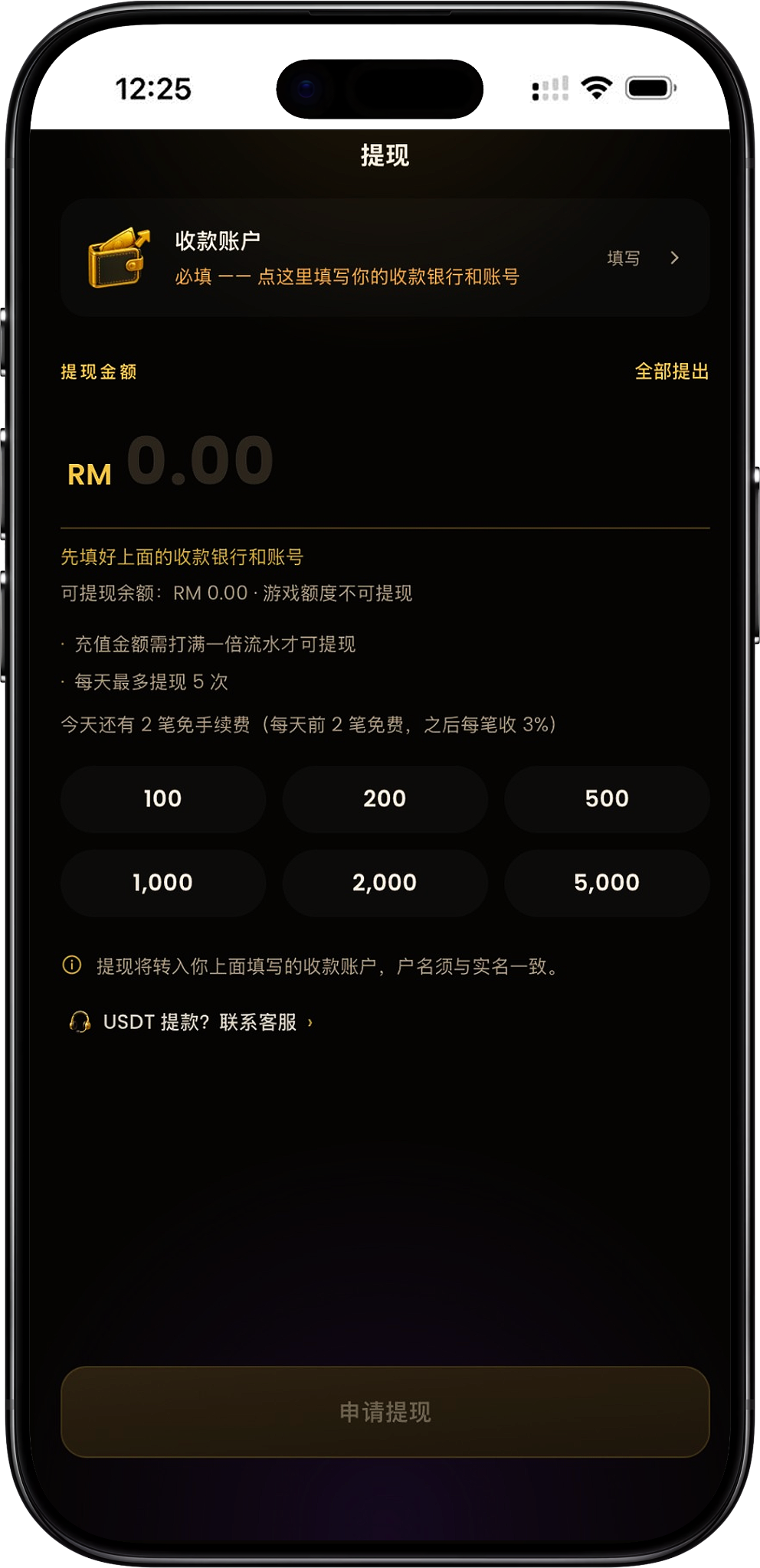
68 NiuNiu withdrawal requires you to first fill in your own receiving account, then enter the withdrawal amount based on the available withdrawable balance and submit the application. The current page requires deposit amounts to clear one times turnover before they can be withdrawn, with a maximum of 2 withdrawals per day; the first 2 withdrawals each day are free of charge, with a 3% fee charged on each withdrawal after that. The receiving account supports Touch 'n Go eWallet as well as a number of banks and e-wallets, and the account name must match your real-name verification details.
- 1. What Conditions Must Be Met for 68 牛牛 Withdrawal?
- 2. 68 牛牛 Withdrawal Steps
- 3. How to Fill In the Withdrawal Receiving Account
- 4. Which Withdrawal Banks and Wallets Does 68 牛牛 Support?
- 5. 68 牛牛 Withdrawal Count and Fees
- 6. How Are the Withdrawable Balance and One-Time Turnover Calculated?
- 7. 68 牛牛 Withdrawal Notes
- 8. 68 牛牛 Withdrawal FAQ
What Conditions Must Be Met for 68 NiuNiu Withdrawal?
First bind your own receiving account
Before applying for a withdrawal, you need to first fill in the bank or e-wallet and account number used for receiving funds in "Receiving Account." The page notes that the withdrawal will be transferred to the account filled in here, so the information should be carefully verified before submission.
The account name must match identity verification
The receiving account name is taken directly from the identity verification information and cannot be modified on your own, and withdrawals can only be made to your own account. When selecting a bank or wallet and entering the account number, you should confirm that the account belongs to the identity-verified person.
The top-up amount needs to complete one-time turnover
The current withdrawal page stipulates that "the top-up amount needs to complete one-time turnover before withdrawal." Game credit itself cannot be withdrawn directly; only funds that meet the turnover requirement and are counted toward the withdrawable balance can be used to apply for withdrawal.
The withdrawal amount cannot exceed the withdrawable balance
The page will display the current "Withdrawable Balance." When entering the withdrawal amount, this value should be used as the basis, and when eligible, the "Withdraw All" function can also be used to fill in the applicable amount.
68 NiuNiu Withdrawal Steps
Step 1: Enter the withdrawal page
After logging into the 68 NiuNiu account, enter the withdrawal feature. If you need to enter the platform, you can use the official Telegram entry: https://t.me/niuniu68_bot?start=6081936318. After entering the withdrawal page, it will display the receiving account, withdrawal amount, withdrawable balance, turnover conditions, and the remaining fee-free count for the day.
Step 2: Click to fill in the receiving account
Before the first withdrawal, click "Fill In" next to "Receiving Account" at the top of the page to enter the receiving information setup page. This information is used to receive the withdrawal funds submitted afterward.
Step 3: Confirm the identity-verified account name
The receiving account page will display the identity-verified account name. This name is obtained from the identity verification information and cannot be modified, and users need to confirm that the bank or wallet account they intend to bind matches this name.
Step 4: Select a bank or e-wallet
After clicking "Bank / Wallet," select the actual receiving channel from the list currently provided by the platform, such as Touch 'n Go eWallet, Maybank, CIMB Bank, Public Bank, or other banks and e-wallets listed on the page.
Step 5: Fill in the receiving account number
After selecting the receiving channel, fill in the corresponding bank account or wallet account number in the "Account" field. Each item should be verified before submission, because the page notes that the receiving account number can only be filled in by the user once.
Step 6: Save the receiving account
After confirming the bank or wallet, identity-verified account name, and account number are correct, click "Save." The page prompts that if the receiving account number needs to be changed after being filled in, customer service must be contacted, so special attention should be paid to account accuracy when filling it in for the first time.
Step 7: Enter the withdrawal amount
Return to the withdrawal page and enter the application amount based on the currently displayed withdrawable balance. The page provides quick amount options such as RM100, RM200, RM500, RM1,000, RM2,000, and RM5,000, and also has a "Withdraw All" entry. The actual submittable amount still depends on the account's withdrawable balance at that time and related conditions.
Step 8: Confirm fees and count
Check the day's withdrawal count and fee notice before submission. The current rule is a maximum of 2 withdrawals per day, and it displays that the first 2 transactions each day are fee-free; the page also notes that each subsequent transaction has a 3% fee. Before applying, the actual status displayed on the page at that time shall prevail.
Step 9: Submit the withdrawal application
After confirming the receiving account, withdrawal amount, withdrawable balance, and related conditions, click "Apply for Withdrawal" to submit. If the page button is not yet available, you should first check whether the receiving account has been filled in, whether there is a withdrawable balance, and whether the one-time turnover requirement has been met.
How to Fill In the Withdrawal Receiving Account
The receiving account name comes from identity verification
After opening the receiving account settings, the account name will be displayed based on the identity verification information, and users cannot modify it on their own. The platform requires withdrawal to one's own account, so the holder of the bank or wallet account should match the identity-verified name.
Select the corresponding bank or wallet
Select the actual receiving channel in the "Bank / Wallet" field. Different users can choose from the options currently provided on the page according to the bank account or e-wallet they hold.
Fill in the account number correctly
Enter the receiving account number corresponding to the selected bank or wallet in the account field. Do not fill in someone else's account number, and avoid missing digits or input errors that could affect subsequent withdrawal receipt.
The receiving account number can only be filled in by yourself once
The current page clearly reminds that "the receiving account number can only be filled in by yourself once; changes afterward require contacting customer service." Therefore, the bank or wallet type, account name, and account number should be carefully verified before the first save.
Which Withdrawal Banks and Wallets Does 68 NiuNiu Support?
Touch 'n Go eWallet
The current withdrawal receiving account list includes Touch 'n Go eWallet. Users can select this e-wallet when binding receiving information and fill in the account information corresponding to their own identity verification.
Malaysian banks
The bank options currently displayed on the page include Maybank, CIMB Bank, Public Bank, RHB Bank, Hong Leong Bank, Bank Islam, AmBank, Affin Bank, Alliance Bank, Bank Rakyat, BSN, OCBC Bank, HSBC Bank, Standard Chartered, UOB Malaysia, Agrobank, Bank Muamalat, MBSB Bank, Al-Rajhi Bank, GXBank, Boost Bank, and AEON Bank. The actual supported list shall be subject to what is displayed in real time on the withdrawal page.
Other e-wallets
In addition to Touch 'n Go eWallet, the current page also displays wallet options such as ShopeePay and GrabPay. When selecting an e-wallet for withdrawal, it is likewise necessary to ensure that the account information belongs to the identity-verified person.
USDT withdrawal
The withdrawal page also features a "USDT withdrawal? Contact customer service" entry. The current interface does not provide the specific amount, network, or operation steps for self-service USDT withdrawal, so when USDT withdrawal is needed, the related arrangements should be learned through the customer service entry provided on the page.
68 NiuNiu Withdrawal Count and Fees
Maximum 2 withdrawals per day
The current withdrawal page notes "maximum 2 withdrawals per day." Therefore, before submitting a withdrawal, you should pay attention to the withdrawal count already used that day and the current application status displayed on the page.
The first 2 transactions each day are fee-free
The page displays that the first 2 withdrawals each day are free and will indicate the remaining fee-free count for the day, for example displaying "2 fee-free transactions remaining today" when no withdrawal has been made yet.
The page notes 3% per transaction afterward
The current page also notes that "the first 2 transactions each day are free, and each transaction afterward has a 3% fee." Since the page also has a limit of a maximum of 2 withdrawals per day, the two notices overlap in wording on the current interface; when actually applying, the withdrawal count allowed by the system at that time and the finally displayed fee shall prevail.
How Are the Withdrawable Balance and One-Time Turnover Calculated?
What is the withdrawable balance?
The withdrawal page separately displays the "Withdrawable Balance," which is the amount currently meeting the withdrawal conditions and available for submitting an application. Game credit cannot be withdrawn directly, so other balances displayed in the account may not equal the withdrawable balance.
What is the one-time turnover requirement?
The current rules require the top-up amount to complete one-time turnover before withdrawal. For example, after completing a top-up, the platform-specified one-time turnover condition must first be met before the corresponding funds can enter the withdrawable range according to the system calculation. The specific completion status shall be subject to what is displayed on the account page.
Why does it show that withdrawal is not possible even though there is money in the balance?
Having a balance in the account does not mean all funds already meet the withdrawal conditions. If the top-up amount has not yet completed one-time turnover, or the related amount still belongs to game credit, the withdrawable balance displayed on the page may be lower than the account balance, or even temporarily RM0.00.
Can I use Withdraw All?
The withdrawal page provides a "Withdraw All" function. When meeting the withdrawal conditions, this entry can be used to fill in the amount according to the current withdrawable balance; before submission, the receiving account and the day's withdrawal rules still need to be confirmed.
68 NiuNiu Withdrawal Notes
Carefully verify before filling in the account number for the first time
The receiving account number can only be filled in by yourself once, and afterward customer service must be contacted to change it. Therefore, do not save directly without confirming the bank, wallet, or account information.
Withdrawals can only be made to your own account
The page notes that the withdrawal will be transferred to the filled-in receiving account and requires the account name to match identity verification. To avoid information mismatch, your own bank account or your own e-wallet should be used as the receiving channel.
Game credit cannot be withdrawn
The current page clearly displays "Game credit cannot be withdrawn." When applying for withdrawal, you should check the withdrawable balance calculated by the system rather than directly filling in the amount based on other account balances.
Complete the turnover requirement before withdrawal
The top-up amount needs to complete one-time turnover before withdrawal. If the "Apply for Withdrawal" button is unavailable, you can first check the current withdrawable balance and turnover completion status.
Pay attention to the day's withdrawal count
The current page has a daily withdrawal count limit. Before submitting an application, confirm whether there are still available withdrawal counts for the day and check the fee-free status displayed on the page.
The bank and wallet list may be adjusted
When making a withdrawal, the bank and e-wallet options currently displayed on the receiving account page shall prevail directly, and whether a certain channel is still available should not be judged solely based on a previously saved list.
68 NiuNiu Withdrawal FAQ
What conditions are needed for 68 NiuNiu withdrawal?
You need to first fill in your own receiving account and ensure that the related top-up amount has completed one-time turnover, while the account has a withdrawable balance, before you can submit a withdrawal application according to the page conditions.
How many times can I withdraw per day on 68 NiuNiu?
The current page notes a maximum of 2 withdrawals per day.
Does 68 NiuNiu withdrawal have a fee?
The current page displays that the first 2 transactions each day are fee-free and notes that each transaction afterward has a 3% fee. At the same time, the page stipulates a maximum of 2 withdrawals per day, so the actual fee and submittable count shall be subject to what the system displays at the time of application.
Why can't I withdraw even though there is a balance?
It may be that the related top-up has not yet completed one-time turnover, or the balance belongs to non-withdrawable game credit. The "Withdrawable Balance" displayed on the withdrawal page should be used to judge the currently applicable amount.
Can I withdraw to Touch 'n Go eWallet?
Yes. The current receiving account list displays Touch 'n Go eWallet as one of the selectable wallets, but the account must meet your own identity verification requirements.
Can I withdraw to a bank account?
Yes. The current page provides multiple Malaysian banks as receiving account options, and the specific available banks shall be subject to what is displayed in real time on the withdrawal page.
Can I use someone else's bank account to withdraw?
No. The page requires the receiving account name to match the identity verification information and notes that withdrawals can only be made to your own account.
What should I do if I filled in the receiving account number incorrectly?
The current page notes that the receiving account number can only be filled in by yourself once, and afterward customer service must be contacted to change it. Therefore, after discovering an information error, it should be handled through customer service, and withdrawals should not continue to be submitted to the wrong account.
Can 68 NiuNiu withdraw USDT?
The page features a USDT withdrawal customer service entry but does not provide complete self-service operation rules. If USDT is needed, you should contact customer service to learn about the currently available methods.
Can I withdraw everything?
The page features a "Withdraw All" function, which can be operated according to the current withdrawable balance, but it still needs to meet the requirements of the receiving account, turnover, and daily withdrawal count.
Apply for 68 NiuNiu Withdrawal
First bind a bank or e-wallet account matching identity verification, confirm the one-time turnover and withdrawable balance, then fill in the withdrawal amount and submit the withdrawal application.