
68 NiuNiu Download Guide
68 NiuNiu download does not require obtaining a separate game APK; the current 68 NiuNiu App runs through Telegram. Users can click the download entry on the 68 NiuNiu official website, go to the official Telegram page and start the bot, then click "Enter Game Hall" from the chat window to open the application. Android, Apple iOS, and Desktop devices running Windows or macOS can all enter following the corresponding steps.
What Do You Need to Know Before Downloading 68 NiuNiu?
The 68 NiuNiu App currently runs through Telegram
Currently, the 68 NiuNiu 68 NiuNiu App runs within Telegram. After users enter the official Telegram page from the official website, they start the bot through "START BOT" and then enter the game hall from the chat window to use the application.
Is it necessary to download a separate 68 NiuNiu APK?
According to the platform usage method currently provided, there is no need to look for or install a separate 68 NiuNiu APK. Android users need to use Telegram to enter the 68 NiuNiu App, so the official entry provided on the official website shall prevail.
Can it be used on both phones and computers?
You can enter according to the Telegram usage method for the corresponding device. Mobile devices include Android and Apple iOS, while Desktop includes Windows and macOS. The entry steps for different devices are similar, and the main process is to go from the official website to the official Telegram, then start the 68 NiuNiu App.
Android Version 68 NiuNiu Download Steps
Step 1: Prepare Telegram on the Android device
When using an Android phone or tablet, first confirm that the device can open Telegram normally. The 68 NiuNiu application currently runs through Telegram, so there is no need to install a separate game APK.
Step 2: Enter the official Telegram from the 68 NiuNiu official website
Use the Android device to open the 68 NiuNiu official website and click the download-related button on the page. The system will redirect to the 68 NiuNiu official Telegram page and display the 68 NiuNiu bot and the "START BOT" button.
Step 3: Click START BOT
Click "START BOT" and allow the page to open the Telegram App. After entering the 68 NiuNiu official bot chat window, you can continue to the next step.
Step 4: Click to enter the game hall
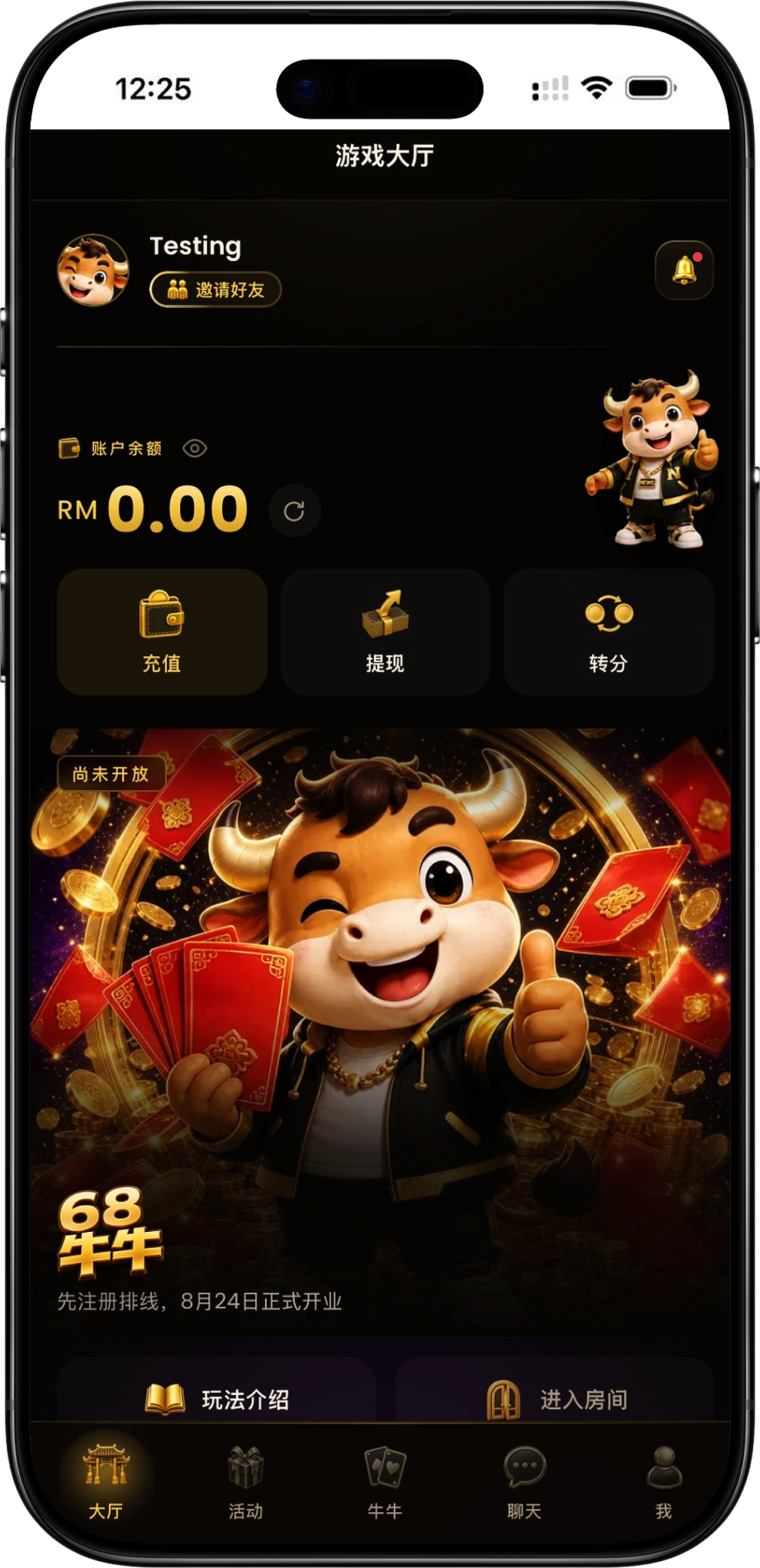
After starting the bot in the Telegram chat window, click "Enter Game Hall." The system will then open the 68 NiuNiu App, and you can enter the game hall to view the account balance, gameplay introduction, and related feature entries.
iOS Version 68 NiuNiu Download Steps
Step 1: Prepare Telegram on the Apple device
When using an iPhone or other supported Apple iOS device, you need to be able to use Telegram normally first. Since the 68 NiuNiu App runs within Telegram, there is currently no need to install a separate 68 NiuNiu iOS game App.
Step 2: Open the official Telegram page through the official website
On the iOS device, enter the 68 NiuNiu official website and click the download-related entry. The page will redirect to the 68 NiuNiu official Telegram and display "START BOT."
Step 3: Start the 68 NiuNiu Telegram bot
After clicking "START BOT," open the Telegram App and enter the 68 NiuNiu bot chat window. Continue operating according to the entry displayed within Telegram.
Step 4: Enter the 68 NiuNiu App
In the bot chat window, click "Enter Game Hall" to start the 68 NiuNiu App. After entering the hall, you can see the account area as well as related entries such as top-up, withdrawal, point transfer, gameplay introduction, and entering rooms.
Windows Version 68 NiuNiu Download Steps
Step 1: Prepare the Desktop usage environment
When using a Windows computer, you need to ensure that Telegram can be opened. 68 NiuNiu is not entered through a separate Windows game installation package but starts the corresponding 68 NiuNiu App from Telegram.
Step 2: Go from the official website to 68 NiuNiu Telegram
Open the 68 NiuNiu official website in a Windows computer browser and click the download-related button. After entering the official Telegram page, you can see the 68 NiuNiu bot and the "START BOT" entry.
Step 3: Click START BOT and open Telegram
Click "START BOT" and open Telegram according to the page prompts. After entering the official bot chat, start the bot and find the "Enter Game Hall" button.
Step 4: Open the game hall
Click "Enter Game Hall" to run the 68 NiuNiu App and enter the corresponding game hall page. Afterwards, you can directly operate according to the features displayed in the hall.
macOS Version 68 NiuNiu Download Steps
Step 1: Prepare Telegram on the Mac
macOS users need to first ensure that the computer can open Telegram normally. The official Telegram page also provides a corresponding Mac Telegram download entry; 68 NiuNiu itself runs through the application within Telegram.
Step 2: Enter Telegram from the 68 NiuNiu official website
Open the 68 NiuNiu official website in a Mac browser and click the download-related entry to go to the official Telegram page. The page will display the 68 NiuNiu bot information and the "START BOT" button.
Step 3: Select START BOT
Click "START BOT" and open Telegram to enter the 68 NiuNiu official bot chat window. If the bot has not been started yet, you can first complete the startup according to the chat window prompts.
Step 4: Start the 68 NiuNiu App
In the Telegram chat window, click "Enter Game Hall" to run the 68 NiuNiu App. After successfully entering, the 68 NiuNiu game hall and related feature entries will be displayed.
How to Open the 68 NiuNiu App from Telegram?
Step 1: Enter the 68 NiuNiu official bot
Whether using Android, iOS, Windows, or macOS, the main entry is the 68 NiuNiu official Telegram. It is recommended to enter through the entry provided on the official website to avoid confusion between different Telegram pages.
Step 2: Start the bot
Click "START BOT" on the official Telegram page to open Telegram. After entering the chat window and starting the bot, the page will display a welcome message and related buttons for entering the hall.
Step 3: Click to enter the game hall
In the chat window, click "Enter Game Hall," and Telegram will open the 68 NiuNiu App. After successfully entering, you can see the game hall, including the account balance and account features such as top-up, withdrawal, and point transfer.
Step 4: Select the relevant entry from the hall
After entering the hall, you can view the "Gameplay Introduction" or select "Enter Room." The bottom also provides navigation for Hall, Activities, NiuNiu, Chat, and Personal Account, and users can enter the corresponding pages as needed.
68 NiuNiu Download FAQ
Does 68 NiuNiu require downloading a standalone App?
According to the current platform usage method, the 68 NiuNiu App runs on Telegram. Users mainly need to enter the official Telegram from the 68 NiuNiu official website and open the game hall through the bot.
Does 68 NiuNiu have a standalone APK?
The platform materials currently provided do not show that a standalone APK needs to be downloaded. Android users can use Telegram to enter the 68 NiuNiu App, so there is no need to look for third-party APK files.
Can iPhone use 68 NiuNiu?
You can enter according to the Apple iOS Telegram usage process. Go from the official website to the official Telegram, click "START BOT" to open Telegram, and then start the 68 NiuNiu App through "Enter Game Hall."
How do I open 68 NiuNiu on Android?
Android users can first use Telegram on the device, then enter the official Telegram page from the 68 NiuNiu official website. After starting the bot, click "Enter Game Hall" to open the application.
Can Windows and macOS be used?
You can enter through Telegram according to the Desktop process. Both Windows and macOS users can go from the 68 NiuNiu official website to the official Telegram, then start the bot and enter the game hall.
Why does clicking download enter Telegram?
Because the 68 NiuNiu App currently runs through Telegram, the download-related entry on the official website guides users to the official Telegram page rather than directly providing a standalone game installation file.
How do I confirm that the 68 NiuNiu App has been successfully opened?
After successfully entering, the "Game Hall" will be displayed, and you can see the account name, account balance, top-up, withdrawal, point transfer, as well as related entries such as gameplay introduction and entering rooms.
Open the 68 NiuNiu App
Enter the official Telegram from the 68 NiuNiu official website, start the bot, and click "Enter Game Hall" to run the 68 NiuNiu App on supported mobile or computer devices.